Milestone 2: Building Intelligence on Top of Automation
Jan 22, 2026
15 min read
Saumil Srivastava
Engineering Leader
Table Of Contents
Loading content outline...
Introduction
Milestone 1 gave me perception infrastructure. The system could see accounting UIs, extract invoice data, and navigate to bill entry forms. Docker containers worked. Session persistence worked. Data collection yielded the right failure ratios for preference learning.
But it couldn't make decisions.
Week 2 was about adding the intelligence layer the reasoning system that determines whether an invoice should be processed, how to match it against purchase orders, and what requires human review versus auto-approval.
The constraint was clear from the start: the reasoning had to be . Not "we'll add guardrails later" bounded, but architecturally constrained by design. Accounting software doesn't tolerate hallucinated decisions.
bounded
This is a dev log of what that actually meant.
TL;DR
Built a bounded reasoning layer on top of UI automation for accounting workflows
Separated deterministic matching, ML classification, LLM reasoning, and policy routing
Discovered a training/eval format mismatch that killed 70% accuracy
Designed HITL as a contract, not a fallback
Solved real production issues: deadlocks, multi-tab state, synthetic data realism
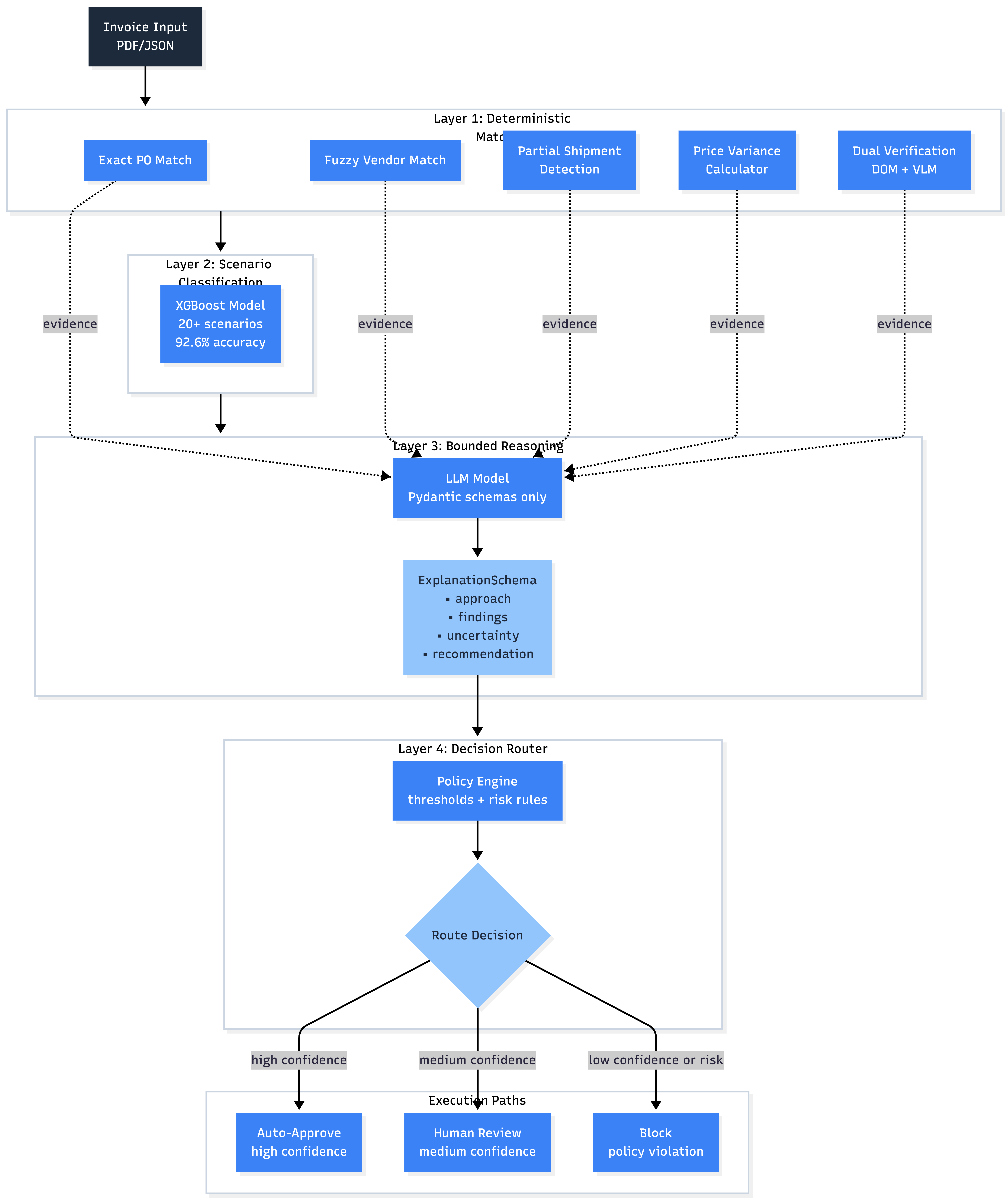
The Architecture: Matchers → Classifier → Reasoner → Router
I settled on a four-layer design:
Layer 1: Matchers (Deterministic)
Exact PO number matching
Fuzzy vendor name matching (Levenshtein distance)
Partial shipment detection (ordered vs received quantities)
Price variance calculation (unit prices across invoice/PO)
The key insight: the LLM explains matcher results, it doesn't replace them.
This separation meant I could test matching logic independently of LLM behavior, log reasoning traces without coupling them to execution, and swap out the LLM later without rewriting decision logic.
The Format Mismatch That Killed 70% Accuracy
Training the UI policy model exposed a problem that cost me a full day.
Week 1's data collection pipeline saved steps with raw CSS selectors:
But the evaluation benchmarks expected human-readable labels:
1Element: Accounting
2
The SFT v1 model achieved 100% format compliance. Perfect structure. But 0% element accuracy.
I discovered this by actually reading model outputs instead of just staring at loss curves. The model was doing exactly what the training data told it to. The training data was just wrong.
The diagnostic signal: Few-shot examples at inference time improved performance dramatically (20% → 60%). That meant I had a format mismatch, not a capability problem. Few-shot was teaching the format that training should have taught.
The fix was surgical:
Added `element_id_to_text_label()` helper function
Converted CSS selectors to labels during training data prep
Validated training outputs matched eval expectations before GPU time
Retrained SFT v2 on corrected data
Element accuracy jumped from 0% to 33%. Still not production-ready, but now the model was learning the right task.
The lesson is simple: validate your training data format matches eval format before you burn GPU hours.
HITL Approval: What It Actually Had to Show
The product UI went through three generations.
Gen 1 Upload invoice, see extraction, click "Continue to Odoo," watch browser stream. Good for demos. No decision surface.
Gen 2 Added scenario badges, AI reasoning panels, match result cards. Still felt like two disconnected experiences.
Gen 3 Five-stage flow matching actual bookkeeper workflow:
Ingest — Upload invoice(s), AI extracts fields with confidence scores
Analyze — System finds PO matches, checks vendor history, classifies scenario
Reason — AI explains findings and uncertainties
Decide — Human reviews ActionPreview, approves or intervenes
Execute — Live browser automation with step-by-step progress
The HITL approval interface (stage 4) became the trust surface.
It had to show:
Invoice summary with risk level (Low/Medium/High)
Planned action steps — not "I'll create a bill" but specific: navigate to Bills, fill Vendor field with "Office Supplies Inc," fill Amount with $1,234.56
"Why I'm Confident" reasoning checklist (PO matches, no duplicates found, vendor history clean)
Vendor context cards — historical transaction data (15 invoices, 100% payment success, last correction 45 days ago)
"After You Approve" outcomes — clear expectations of what happens next
Optional feedback input for future training
This design came from user research. Bookkeepers didn't just want to see what the system would do. They wanted to understand why it was confident and what would happen if something went wrong.
The ActionPreview component became the contract between human and agent.
Multi-Tab Automation and the Cross-System Problem
One scenario kept breaking: invoices requiring cross-system verification.
Example: Invoice references PO #1001 in Odoo, but the purchase order lookup lives in Google Sheets because the vendor uses a custom spreadsheet for PO tracking.
Single-tab automation couldn't handle this.
I extended the streaming session to maintain a tab registry:
1create_tab(url) → TabInfo
2switch_tab(tab_id) → activate specific tab
3get_all_tabs() → list tabs with metadata
4close_tab(tab_id) → cleanup
5
The UI got a TabSwitcher component (visual tab bar) and TabWorkflowIndicator (cross-system workflow progress).
The backend workflows could now orchestrate:
Open Odoo → search for invoice
Switch to Sheets tab → find PO data
Switch back to Odoo → verify quantities
Proceed with bill creation
This unlocked 3-way matching (Invoice ↔ PO ↔ Receipt):
Invoice line items vs PO line items (quantities, prices)
PO vs Goods Receipt Note (ordered vs received quantities)
Flag discrepancies (partial shipments, overbilling, quantity mismatches)
The ThreeDocComparison UI component shows all three documents side-by-side with line-level highlighting. The PartialShipmentCalculator visualizes ordered vs received quantities with progress bars.
Multi-tab orchestration turned out to be a forcing function for better state management. Every tab switch required explicit state serialization and restoration.
The ML Service Isolation Problem
About halfway through Week 2, the system started deadlocking.
XGBoost and Docling both use C/C++ extensions. Loading them dynamically in the same Python process caused GIL-related deadlocks. The main API would hang on classification calls. Restarting fixed it temporarily, then it would hang again.
I tried thread pools, process pools, lazy loading, preloading. Nothing worked reliably.
The only solution that held up: process isolation.
I split the architecture:
Main API :
Handles HTTP requests
Manages browser sessions
Routes decisions
No ML workloads
ML Inference Service
PDF extraction (Docling, 2GB memory footprint)
Invoice classification (XGBoost models)
VLM routing
This added ~50ms latency per call but eliminated deadlocks entirely.
The lesson: C extensions and dynamic loading don't mix. If you can't control initialization order, isolate the process.
Synthetic Data at Scale
Training XGBoost required 20,000+ labeled examples across 20+ scenarios. Hand-labeling wasn't viable.
The XGBoost model generalized surprisingly well to real invoices. 92.6% accuracy on held-out synthetic test set translated to 87-89% accuracy on the small set of real invoices I could validate.
The key was distribution matching. Synthetic data had to reflect real-world scenario frequencies: 3-way matches are common (40%), duplicates are rare (1%), overbilling is somewhere in between (5-8%).
Target for Week 3: <20% (DPO preference learning on user corrections)
The Bounded Reasoning Constraint
Can a human see why this happened?
The streaming UI shows:
Which matchers fired and with what confidence
What the classifier predicted and why
What the reasoner found and what it's uncertain about
What the router decided based on policy thresholds
This started as debugging infrastructure. It's clearly part of the product.
Every "confidence score" had to answer: Would a bookkeeper trust this? Would an auditor accept this explanation? Would a firm owner feel in control or steamrolled?
Opacity is tolerable in demos. It breaks down when mistakes have consequences.
Open Questions
Does bounded reasoning scale to more complex scenarios (intercompany transfers, construction progress billing)?
When the classifier is uncertain (confidence 60-80%), should we show the human why it's uncertain or just route to HITL?
How should we handle distribution shift—invoices from industries not in the training set?
What's the right threshold for auto-approval? 95% confidence? 98%? Does it vary by scenario type?
Can preference learning (DPO on user corrections) reduce HITL trigger rate without increasing false negatives?
Should the reasoner see vendor history context, or does that bias it toward status quo?
What Milestone 2 Actually Produced
Not full autonomy. But the intelligence layer is operational:
Structured LLM reasoning with Pydantic schemas (no free-form hallucinations)
HITL approval interface with ActionPreview contract
Multi-tab orchestration for cross-system workflows
ML service isolation (no more deadlocks)
Synthetic data pipeline (20,000+ labeled examples)
First policy training runs (SFT/DPO with format-corrected data)
The system can now:
Classify 20+ invoice scenarios
Detect PO matches, partial shipments, price variances
Explain its reasoning in structured format
Route to auto-approve (42% of cases) or human review
Execute multi-step workflows across browser tabs
Next step: preference learning on HITL decisions , then vision-grounded policies and drift detection. I might have switch order.
The goal isn't to eliminate human judgment. It's to handle the 80% the system is confident about, escalate the 15% that need review, and block the 5% that are clearly wrong.
Trust comes from knowing the boundaries.
------
Milestone 2 of 6 · January 2026
Subscribe to the Newsletter
Get weekly insights on AI implementation, performance measurement, and technical case studies.
Join the Newsletter
Get weekly insights on AI implementation and technical case studies.
I'm building a computer-use agent against real enterprise UIs. Not an API wrapper—something that has to perceive interfaces, identify real elements, and act in a way a human can inspect and understand.