Multimodal Embeddings with Cohere Embed v4: PDF Document Search Implementation
Apr 18, 2025
8 min read
Saumil Srivastava
Engineering Leader
Table Of Contents
Loading content outline...
Technical Introduction: Solving the Document Search Challenge
Document search has historically faced limitations when handling mixed-media content. Traditional approaches often required separate pipelines for text and images, creating unnecessary complexity and potential failure points. Cohere's Embed v4 model addresses this challenge by offering a unified embedding model that processes both text and images, enabling more efficient and accurate search across document collections.
In this implementation guide, we'll build a practical PDF search system using the Embed v4 model, focusing on the specific code patterns and architecture decisions that enable reliable, production-ready functionality.
Multimodal Embeddings with Cohere Embed v4: PDF Document Search Implementation | Saumil Srivastava's Blog
Core Implementation with Cohere Embed v4
Based on the sample notebook provided, let's examine the key components needed to build a functional PDF search system. We'll focus on three critical implementation areas:
1. PDF Processing and Image Optimization
The first step involves converting PDF pages to images and preparing them for the embedding API:
This code handles the crucial task of preprocessing images before sending them to Cohere's API. The `resize_image` function ensures we don't exceed size limitations while maintaining image quality, and the `base64_from_image_obj` function converts the image to the required base64 data URI format.
2. Batch Processing Implementation
Processing documents efficiently requires thoughtful batching to optimize API usage:
1# Batching settings2BATCH_SIZE =43SLEEP_INTERVAL =145current_batch_inputs =[]6current_batch_labels =[]7current_batch_img_paths =[]89for pdf_file in pdf_files:10 pdf_path = os.path.join(PDF_DIR, pdf_file)11 pdf_label_base = os.path.splitext(pdf_file)[0]1213try:14 page_images = convert_from_path(pdf_path, dpi=150)1516for i, page_image inenumerate(page_images):17 page_num = i +118 page_label =f"{pdf_label_base}_p{page_num}"1920# Save page image to disk21 img_path = os.path.join(IMG_DIR,f"{page_label}.png")22 page_image.save(img_path)2324# Prepare for embedding25 base64_img_data = base64_from_image_obj(page_image)26 api_input_document ={"content":[{"type":"image","image": base64_img_data}]}2728# Add to current batch29 current_batch_inputs.append(api_input_document)30 current_batch_labels.append(page_label)31 current_batch_img_paths.append(img_path)3233# Process batch if full34iflen(current_batch_inputs)>= BATCH_SIZE:35 response = co.embed(36 model="embed-v4.0",37 input_type="search_document",38 embedding_types=["float"],39 inputs=current_batch_inputs,40)41 page_embeddings_list.extend(response.embeddings.float)42 pdf_labels_with_page_num.extend(current_batch_labels)43 img_paths.extend(current_batch_img_paths)4445# Reset batch46 current_batch_inputs =[]47 current_batch_labels =[]48 current_batch_img_paths =[]49 time.sleep(SLEEP_INTERVAL)# Prevent rate limiting5051except Exception as e:52print(f"Error processing {pdf_file}: {e}")53
This batch processing approach offers several advantages:
Reduces the number of API calls
Improves throughput by processing multiple pages at once
Includes error handling for robustness
Implements proper pausing between batches to avoid rate limits
3. Search Functionality
The core search function demonstrates how to use embeddings to find relevant documents:
1defsearch(query, topk=1, max_img_size=800):2"""Searches page image embeddings for similarity to query and displays results."""3print(f"\n--- Searching for: '{query}' ---")45try:6# Compute the embedding for the query7 api_response = co.embed(8 model="embed-v4.0",9 input_type="search_query",# Crucial: use 'search_query' type10 embedding_types=["float"],11 texts=[query],12)13 query_emb = np.asarray(api_response.embeddings.float[0])1415# Compute cosine similarities16 cos_sim_scores = np.dot(query_emb, doc_embeddings.T)1718# Get the top-k largest entries19 actual_topk =min(topk, doc_embeddings.shape[0])20 topk_indices = np.argsort(cos_sim_scores)[-actual_topk:][::-1]2122# Show the results23print(f"Top {actual_topk} results:")24for rank, idx inenumerate(topk_indices):25 hit_img_path = img_paths[idx]26 page_label = pdf_labels_with_page_num[idx]27 similarity_score = cos_sim_scores[idx]28print(f"\nRank {rank+1}: (Score: {similarity_score:.4f})")29print(f"Source: {page_label}")3031# Display the image32 image = Image.open(hit_img_path)33 image.thumbnail((max_img_size, max_img_size))34 display(image)3536except Exception as e:37print(f"Error during search for '{query}': {e}")38
This function:
Embeds the user's query using the appropriate `search_query` input type
Computes similarity scores between the query and all document embeddings
Identifies and displays the most relevant pages based on cosine similarity
Shows both metadata and visual results to the user
Key Technical Insights from Implementation
The sample implementation reveals several important technical considerations for working effectively with Cohere's multimodal embeddings:
Input Type Differentiation
Cohere's API distinguishes between different input types, which is crucial for optimal performance:
1# For document pages (content being searched)2response = co.embed(3 model="embed-v4.0",4 input_type="search_document",# Content being indexed5 embedding_types=["float"],6 inputs=documents,7)89# For queries (search terms)10response = co.embed(11 model="embed-v4.0",12 input_type="search_query",# Search query13 embedding_types=["float"],14 texts=[query],15)16
Using the correct input type ensures proper embedding alignment between queries and documents.
Embedding Customization Options
The implementation demonstrates several embedding customization options:
Dimension Control: Selecting appropriate dimensionality for your use case
Float vs. Binary: Options for different precision/storage tradeoffs
Batching Control: Optimizing throughput and resource usage
Error Handling for Production Systems
The code includes robust error handling patterns essential for production systems:
1try:2# Attempt batch processing3 response = co.embed(...)45except Exception as e:6# Log the error7print(f"Error processing batch: {e}")89# Continue with remaining content10# Don't let one failure stop the entire pipeline11
This defensive approach ensures the system degrades gracefully rather than failing completely when issues arise.
Key Advantages of Cohere Embed v4
Beyond the implementation details, Cohere Embed v4 offers several technical advantages that make it particularly suitable for document search applications:
1. Extended Context Length
Embed v4 supports up to 128K tokens of context, a significant increase over previous embedding models. This allows you to embed entire lengthy documents without chunking, preserving context and reducing complexity in your processing pipeline.
2. Matryoshka Embeddings
Embed v4 offers variable dimension outputs (256, 512, 1024, or 1536) from a single model, allowing you to balance accuracy and efficiency:
1# Full-dimensional embeddings for maximum accuracy2high_precision = co.embed(3 model="embed-v4.0",4 texts=documents,5 output_dimension=15366)78# Reduced dimensionality for faster search and lower storage9efficient = co.embed(10 model="embed-v4.0",11 texts=documents,12 output_dimension=256# ~6x storage reduction13)14
3. Compression Options
The model supports int8 and binary embedding types, offering substantial storage savings with minimal performance impact:
1# Using int8 quantization for ~4x storage reduction2response = co.embed(3 model="embed-v4.0",4 texts=documents,5 embedding_types=["int8"],# Instead of default float6)7
4. Cost Efficiency
The multimodal capabilities eliminate the need for separate OCR and text processing pipelines, potentially reducing both implementation costs and processing time. While Cohere's pricing for Embed v4 is approximately 0.12 per 1,000 tokens for text and 0.47 per 1,000 "image tokens,"the unified processing approach can offer overall cost advantages by simplifying architecture and improving accuracy.
Visualizing Embedding Performance
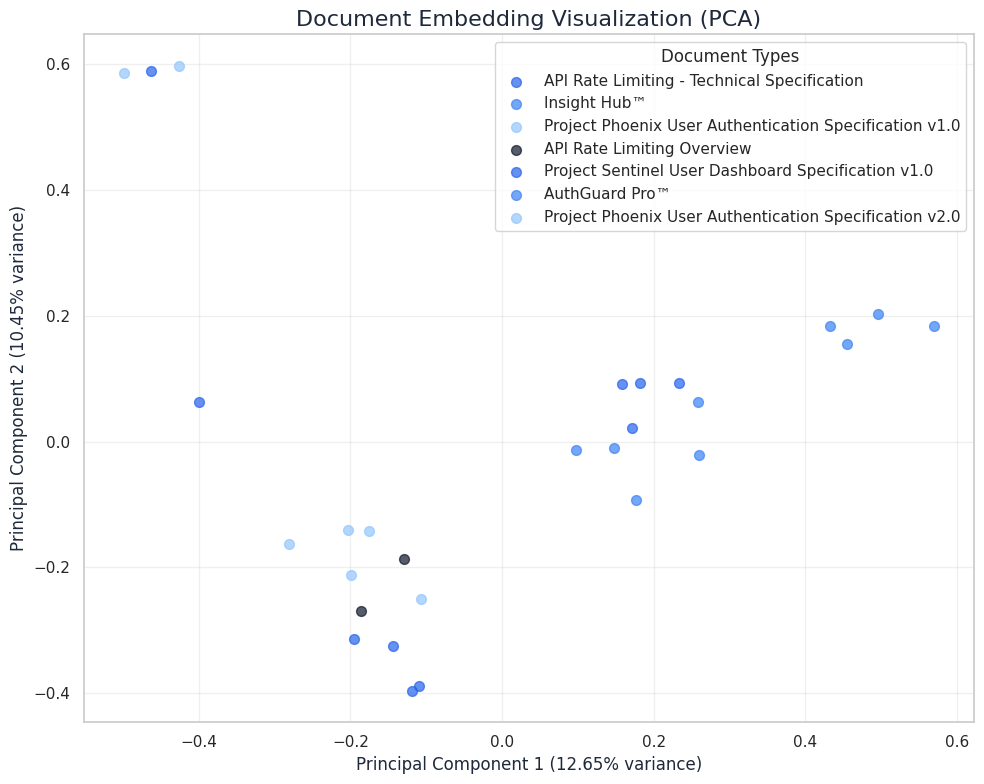
To better understand how Embed v4 represents document relationships, we can visualize the embeddings using Principal Component Analysis (PCA). This technique reduces the high-dimensional embeddings to two dimensions for visualization while preserving as much structure as possible.
In the following visualization, we can see how different document types cluster in the embedding space:
Figure 1: PCA visualization of document embeddings showing clustering by document type. Note how similar document types (e.g., Phoenix User Authentication Specifications v1.0 and v2.0) appear in proximity, while distinct document types form separate clusters.
This visualization demonstrates several important aspects of Cohere's embedding performance:
Semantic Clustering: Documents of similar types naturally cluster together in the embedding space
Version Differentiation: Different versions of the same document (e.g., Project Phoenix v1.0 vs v2.0) are positioned near each other but maintain separation
Content-Based Organization: Technical specifications with similar topics appear closer together than unrelated documents
The clear clustering indicates that the embeddings effectively capture semantic relationships between documents, making them ideal for information retrieval and organization tasks.
Cohere Embed v4 Features Demonstrated
The notebook effectively showcases several key features of Cohere's Embed v4 model:
Direct Image Embedding: PDF pages are converted to images and embedded directly without OCR
Search Query vs. Document Differentiation: Using appropriate `input_type` parameters for each use case
Flexible Output Format: Working with float embeddings for highest accuracy
Batch Processing Support: Efficiently handling multiple documents in a single API call
Conclusion
Implementing document search with Cohere Embed v4 represents advancement in how we handle complex, mixed-media documents. The multimodal capabilities simplify architecture while improving search accuracy, particularly for technical documentation containing diagrams, tables, and code snippets.
The implementation demonstrated in this blog post shows how a relatively small amount of code can create a powerful document search system by leveraging Cohere's advanced embedding capabilities. By converting PDF pages to images and embedding them directly, we avoid complex OCR pipelines while preserving valuable visual information that traditional text-only approaches would miss.
For organizations dealing with large volumes of technical documentation, this approach can dramatically improve knowledge accessibility and discovery, enabling teams to find specific information within seconds rather than hours of manual searching.